| Support Category: Transcript |
| Specialist Notes: |
Several employees are currently on administrative leave and no longer have access to their @ncua.gov email addresses. As a result, they are unable to log into LAMP, despite having an active account. These users may reach out requesting a copy of their transcript.
The NCUA LAMP Administrators have confirmed that we have permission to assist these users by providing a temporary password via chat, allowing them to access their LAMP account to retrieve their transcript report.
Only provide the temporary password in chat after verifying the following:
- Confirm the user has provided the correct email address associated with their LAMP account.
- Confirm the user's record includes an ID that begins with "VPS-" followed by numbers (e.g., "VPS-20250418"). This will appear in the ‘User Record Custom Field’ > ‘Organization Line 6’. [See screenshot below]
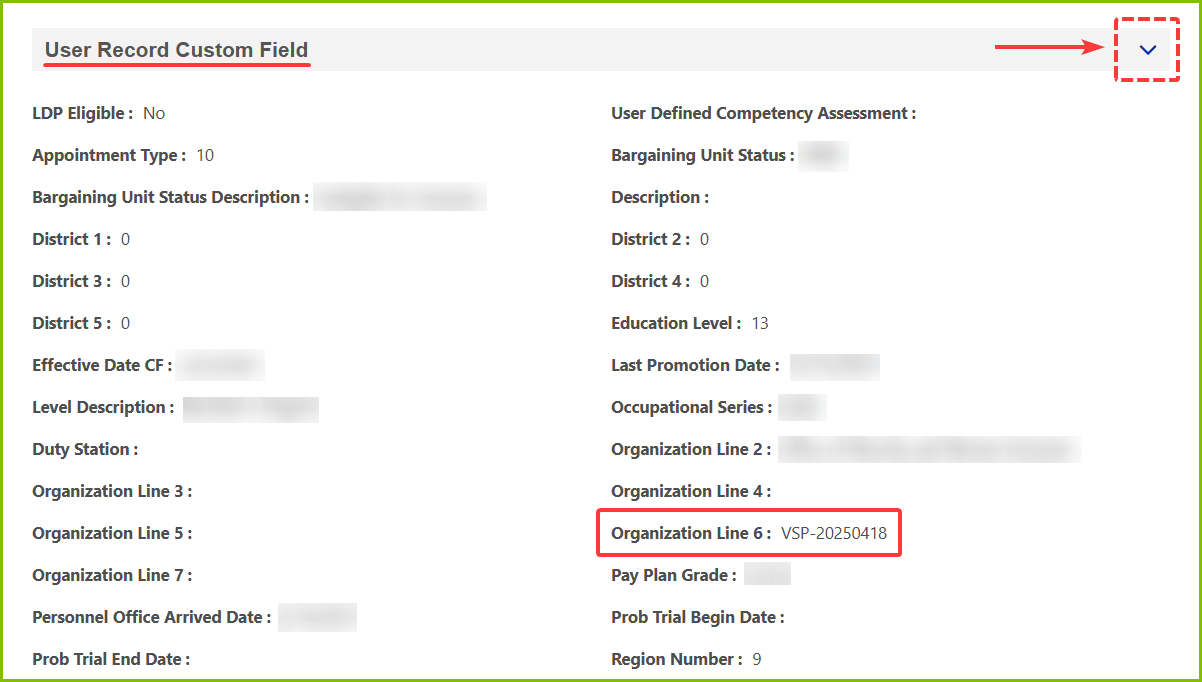
Once both criteria are confirmed, proceed with providing the standard response below and then the temporary password.
| Standard Response: |
Thank you for your patience while I looked into this for you! The NCUA LAMP Administrators advised that we are permitted to provide you with a temporary password here in chat so you can access your NCUA LAMP account and obtain your transcript report, since you don't currently have access to your @ncua.gov email address. One moment while I reset the password for you.
Transcript Report Instructions:
1. Once logged in, navigate to your transcript and click the three-dot button in the top-right corner.
2. Select ‘Run Transcript Report’.
3. On the report setup page, be sure to checkmark the ‘Include Archived Training’ and ‘Include Completed Training Only’ options.
4. Then click ‘Run Report’ to generate your transcript.
